Category: Technology

  • Gigabyte X870E AORUS Master Review

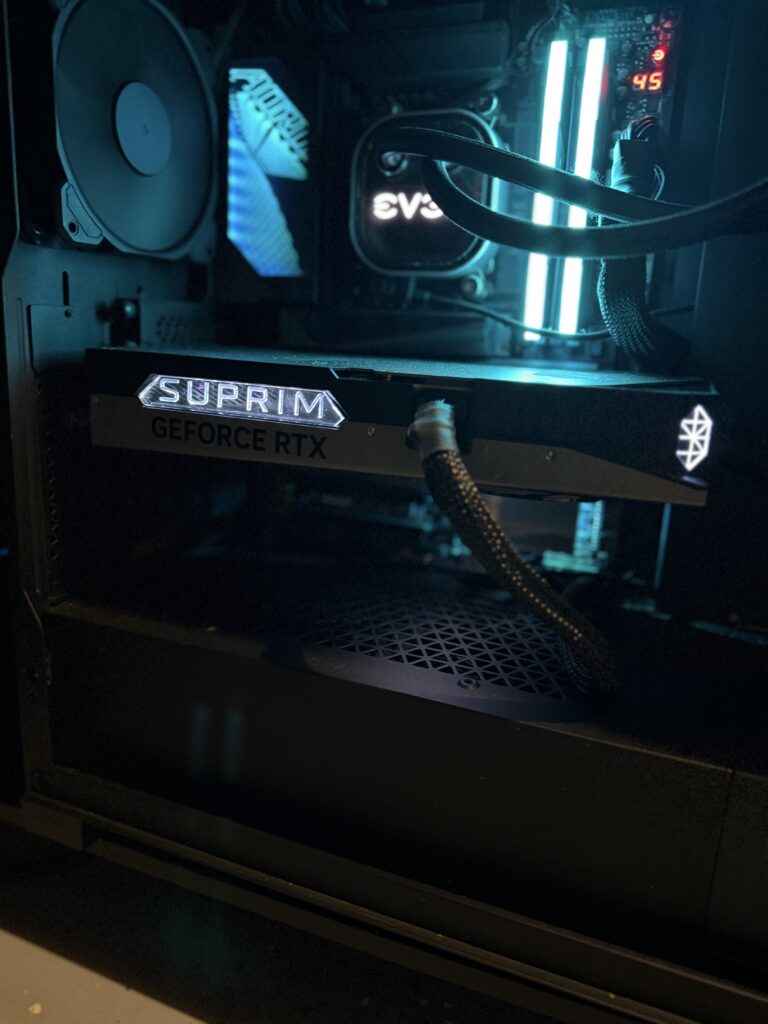
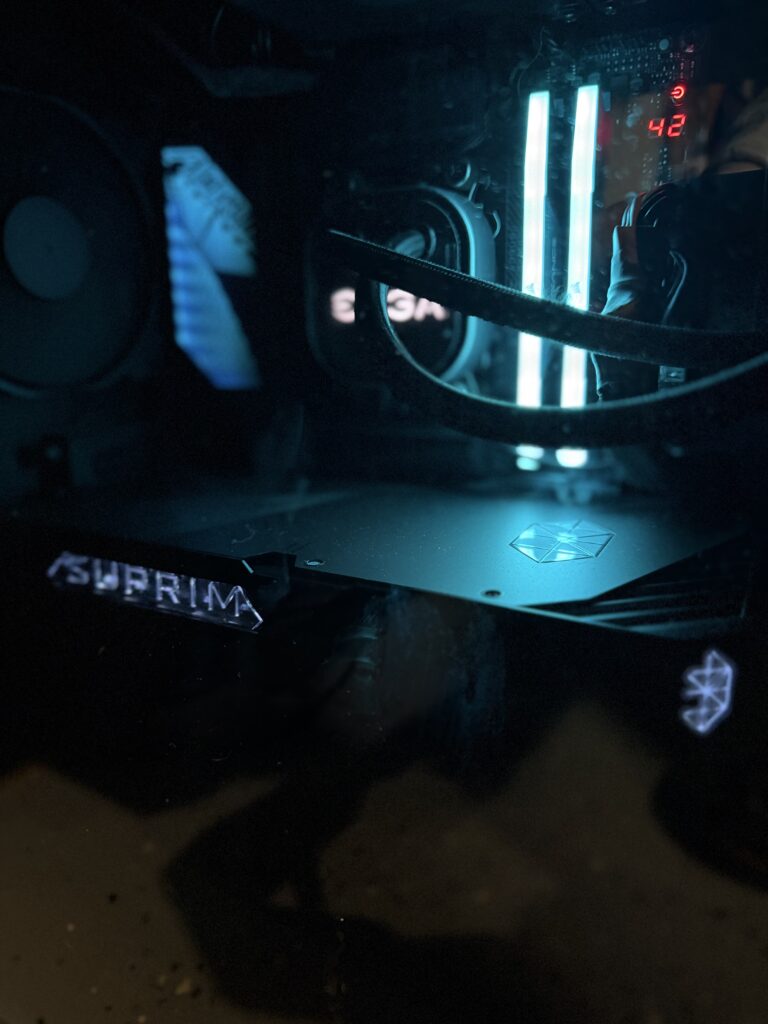
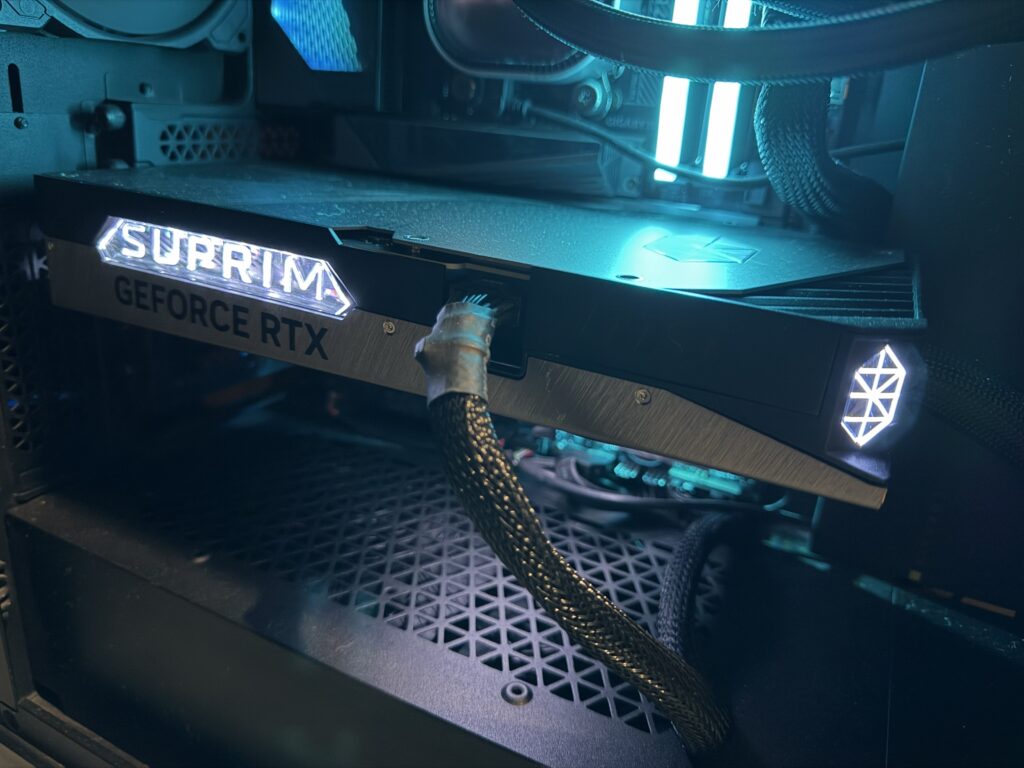
    5090 MSI Liquid Suprim On Gigabyte X870E AORUS Master, Corsair VENGEANCE  DDR5-6000 PC5-48000
    5090 MSI Liquid Suprim On Gigabyte X870E AORUS Master, Corsair VENGEANCE DDR5-6000 PC5-48000

    Motherboards are funny.

    Nobody gets excited about motherboards.

    People get excited about CPUs.

    People get excited about GPUs.

    People get excited about benchmark numbers.

    Meanwhile the motherboard quietly does all the hard work while everyone pretends it doesn’t exist.

    The Gigabyte X870E AORUS Master is one of the few motherboards that actually made me appreciate the motherboard itself.

    Not because it magically made my system faster.

    It didn’t.

    Physics remains stubbornly undefeated.

    What it did do was make building, upgrading, and maintaining my system genuinely enjoyable.

    The EZ-Latch system.

    The tool-free M.2 installation.

    The diagnostic display.

    The oversized cooling.

    The absurd amount of metal.

    And I do mean absurd.

    This thing feels less like a motherboard and more like a piece of infrastructure.

    If civilization collapses and we find ourselves fending off medieval raiders, I’m reasonably confident this board could serve as a shield.

    Possibly a small door.

    Maybe light body armor.

    The point is:

    This thing is built like a tank.


    💩 Poop Rating

    💩 1/4 Poops

    Excellent Crap.

    Expensive? Sometimes.

    Overbuilt? Absolutely.

    Worth it? In the right situation, yes.


    Why This Review Matters

    If you’re researching:

    • Gigabyte X870E AORUS Master Review
    • Best X870E motherboard
    • AM5 enthusiast motherboard
    • Ryzen 9000 motherboard
    • X870E motherboard comparison
    • AORUS Master worth buying

    this review combines extensive research with real-world ownership experience.


    First Impressions

    The very first thing I noticed was the weight.

    Seriously.

    Pick this thing up.

    The PCB is thick.

    The heatsinks are enormous.

    The cooling hardware is substantial.

    The board uses an 8-layer PCB with 2-ounce copper construction and some of the largest VRM cooling Gigabyte has ever attached to a gaming motherboard. Independent testing found VRM temperatures staying remarkably cool even under a Ryzen 9 9950X stress load. (TechSpot, TechPowerUp)

    You immediately understand where some of your money went.

    This does not feel like a budget board wearing expensive clothing.


    Building On It Is Genuinely Nice

    Most motherboards aren’t fun to work on.

    This one is.

    The EZ-Latch system deserves a special mention.

    The M.2 installation mechanism is fantastic.

    No tiny screws.

    No balancing acts.

    No hunting for hardware that launched itself into another dimension when it hit the floor.

    Multiple reviewers specifically praised Gigabyte’s screwless M.2 system as one of the best implementations currently available.

    The GPU release mechanism is another feature that sounds insignificant until you’re trying to remove a giant RTX card wedged into a packed case.

    Then suddenly it feels brilliant.

    These aren’t flashy features.

    They’re quality-of-life improvements.

    And unlike RGB lighting, you actually use them.


    Stability Has Been Outstanding

    This is the most important section.

    My board has been boring.

    And I mean that as the highest compliment possible.

    No crashes.

    No USB issues.

    No networking issues.

    No strange hardware behavior.

    No mysterious gremlins living in the BIOS.

    Just stability.

    Professional testing generally mirrors that experience, with no widespread reports of USB instability, networking failures, storage problems, or platform-level defects specific to the AORUS Master.

    A motherboard’s primary job is getting out of the way and letting the rest of the system do its thing.

    The X870E AORUS Master excels at that.


    Cooling Is Almost Comically Overbuilt

    The cooling solution borders on ridiculous.

    Massive VRM heatsinks.

    Massive M.2 heatsinks.

    Heatpipes.

    Armor.

    Shields.

    Probably classified military equipment.

    Testing showed VRM temperatures around 62°C even under sustained Ryzen 9 workloads, which is outstanding for a board of this class.

    The practical result?

    The board stays cool.

    Very cool.

    Most users will never push it hard enough to care.

    Which is exactly what you want.


    The Lighting Doesn’t Scream For Attention

    One thing I appreciate is restraint.

    The RGB lighting isn’t trying to turn my office into a nightclub.

    It’s tasteful.

    Subtle.

    Classy.

    As someone rapidly approaching “old man complains about RGB” territory, I appreciate that.

    It looks premium rather than flashy.


    Is It Really Overpriced?

    This is where I disagree with some of the reviews.

    On paper, they’re not wrong.

    Several competing boards offer comparable features for less money.

    The MSI MPG X870E Carbon WiFi is often cited as one of the better value alternatives.

    The ASRock X870E Taichi also provides strong specifications at lower prices.

    That’s all true.

    But here’s the thing.

    Motherboards aren’t always purchased at MSRP.

    I’ve seen the AORUS Master bundled with CPUs, memory, and complete build packages often enough that the value equation changes dramatically.

    At full MSRP, you’re absolutely justified in comparing every feature against competing boards.

    In a bundle?

    Now we’re talking about what the board actually costs you.

    And suddenly the value proposition gets much more attractive.


    Features I Actually Use

    The best features aren’t necessarily the ones marketing departments talk about.

    The features I appreciate most are:

    • EZ-Latch GPU release
    • Tool-free M.2 installation
    • POST code display
    • Debug LEDs
    • Q-Flash Plus
    • Massive cooling
    • Excellent connectivity
    • Stable BIOS support

    These are the things you keep using long after the excitement of a new build wears off.


    Support Matters

    Gigabyte deserves some credit here.

    The board continued receiving BIOS updates throughout 2025 and 2026, including:

    • Memory compatibility improvements
    • Ryzen CPU support updates
    • Security patches
    • Platform stability enhancements

    That’s exactly what you want on a premium motherboard that may remain in service for years.

    Useful links:


    Would I Buy It Again?

    Yes.

    Without hesitation.

    Would I buy it at full MSRP?

    Maybe.

    The deal matters.

    The market matters.

    Competition matters.

    But if I found myself building another high-end AM5 machine and this board was available in one of the excellent bundles that frequently appear?

    Absolutely.

    The X870E AORUS Master isn’t the best value motherboard I’ve ever owned.

    It might be the nicest motherboard I’ve ever owned.

    Those aren’t always the same thing.


    Pros & Cons

    ✅ Pros

    • Built like a tank
    • Excellent cooling
    • Rock-solid stability
    • Fantastic EZ-Latch M.2 system
    • Great GPU release mechanism
    • Excellent diagnostics
    • Premium construction
    • Plenty of connectivity
    • Strong BIOS support
    • Tasteful lighting
    • Makes upgrades significantly easier

    ❌ Cons

    • Expensive at MSRP
    • More motherboard than most gamers need
    • Competing boards can offer better paper value
    • Massive heatsinks occasionally get in the way
    • Premium features may be wasted on simpler builds

    Final Verdict

    The Gigabyte X870E AORUS Master isn’t for everyone.

    Most people can spend less and get essentially the same gaming performance.

    That’s just the reality of modern motherboards.

    But that’s missing the point.

    The AORUS Master wins through build quality, ease of use, cooling, diagnostics, and long-term ownership satisfaction.

    It’s one of those rare components that still makes you smile when you open the side panel months later.

    And in a world where most motherboards disappear into the background, that’s worth something.


    Final Poop Score

    💩 1/4 Poops

    Excellent Crap.

    A motherboard so massively overbuilt it feels like Gigabyte accidentally shipped part of a battleship with your computer.

    Reliable.

    Cool.

    Easy to work on.

    And sturdy enough that if the apocalypse comes, I’ll probably take the motherboard. 🖥️💩🛡️

    5090 MSI Liquid Suprim
    5090 MSI Liquid Suprim

    Additional Resources

    • Gigabyte X870E AORUS Master Official Page
      Gigabyte Product Overview
    • Gigabyte Support & BIOS Updates
      https://www.gigabyte.com/Motherboard/X870E-AORUS-MASTER/support
    • Independent Testing TechPowerUp Review
    • Platform Information https://www.amd.com/
  • The No-BS GPU Buying Guide 2026

    5090 MSI Liquid Suprim

    The No-BS GPU Buying Guide 2026

    Which Graphics Card Should You Actually Buy?

    Introduction

    The graphics card market is more confusing than ever. You can spend $250 or $3,000 and every manufacturer will happily tell you their card is the one you need.

    The problem is that most people either buy far more GPU than they need or not enough to last more than a couple of years.

    This guide looks at the current NVIDIA, AMD, and Intel lineups and answers the question nobody in marketing wants to answer:

    Which cards are actually worth buying?

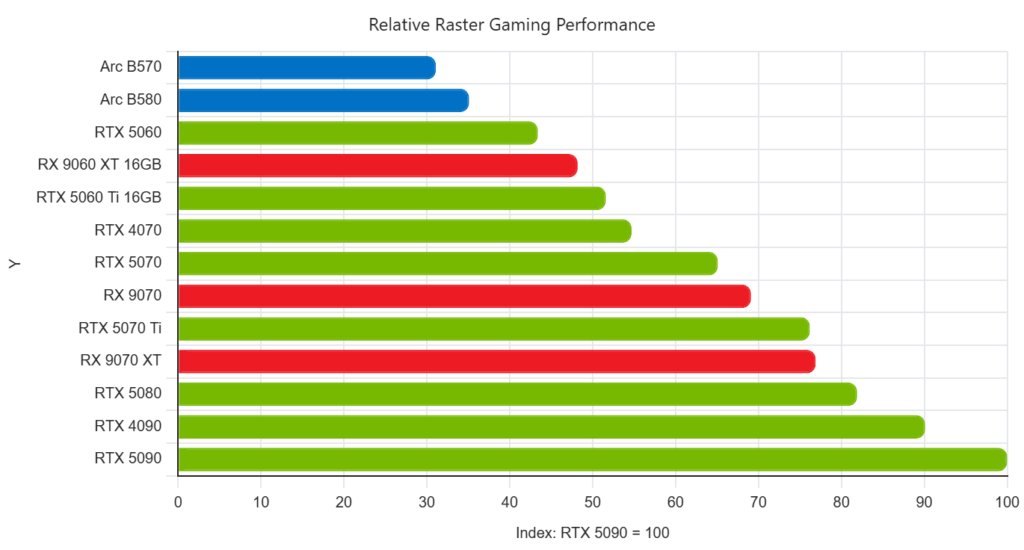
    GPU Performance Chart

    Current GPU Stack

    Budget GPUs

    GPUVRAMBest ForMy Take
    Intel Arc B58012GB1080p UltraBudget king
    RTX 50608GBEsportsHard sell
    RX 9060 XT 16GB16GB1080p/1440pStrong value

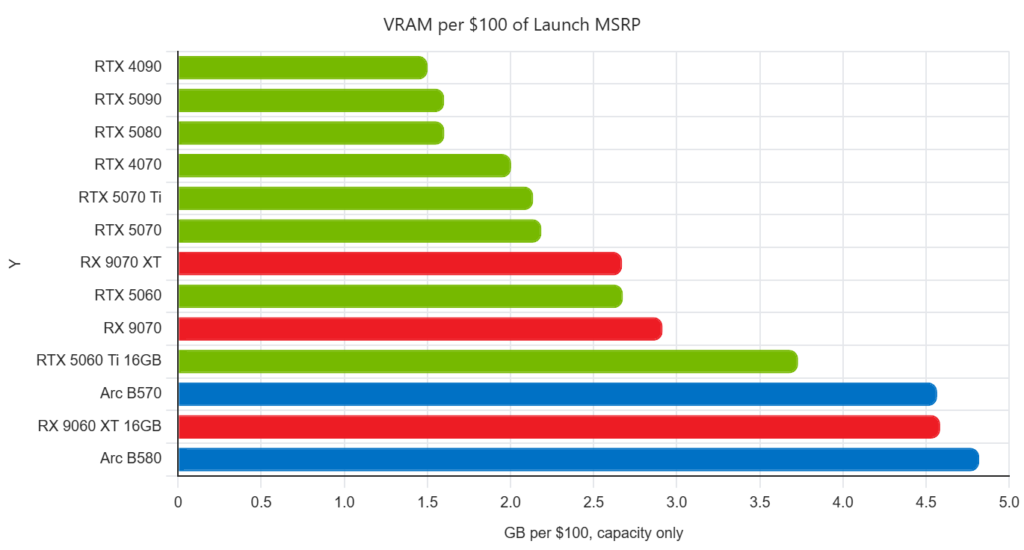
    Current Arc B580 cards typically offer 12GB VRAM at around the $249 class, making them unusually strong budget options for 1080p and entry-level 1440p gaming. [ngxptech.com], [howtogeek.com]

    Poop Rating

    GPUCraps
    Arc B580💩
    RX 9060 XT 16GB💩
    RTX 5060💩💩💩

    Midrange GPUs

    GPUVRAMResolution
    RTX 507012GB1440p
    RX 907016GB1440p Ultra
    RTX 5070 Ti16GB1440p / Entry 4K

    The RTX 5070 is still the default recommendation for most gamers, while the RTX 5070 Ti tends to be the sweet spot for performance enthusiasts. RTX 5070 models typically ship with 12GB VRAM, while the RTX 5070 Ti carries 16GB. [windminers.com], [en.wikipedia.org]

    Best Value Winner

    🏆 RTX 5070 Ti

    The card most people wish they’d bought a year later.


    High-End GPUs

    GPUVRAMVerdict
    RX 9070 XT16GBAMD’s best gaming value
    RTX 508016GBPremium but sensible
    RTX 509032GBUnhinged

    The RTX 5090 offers 32GB VRAM and sits at the top of NVIDIA’s stack, while the RTX 5080 delivers much of the experience at a significantly lower cost. [nvidia.com], [en.wikipedia.org]


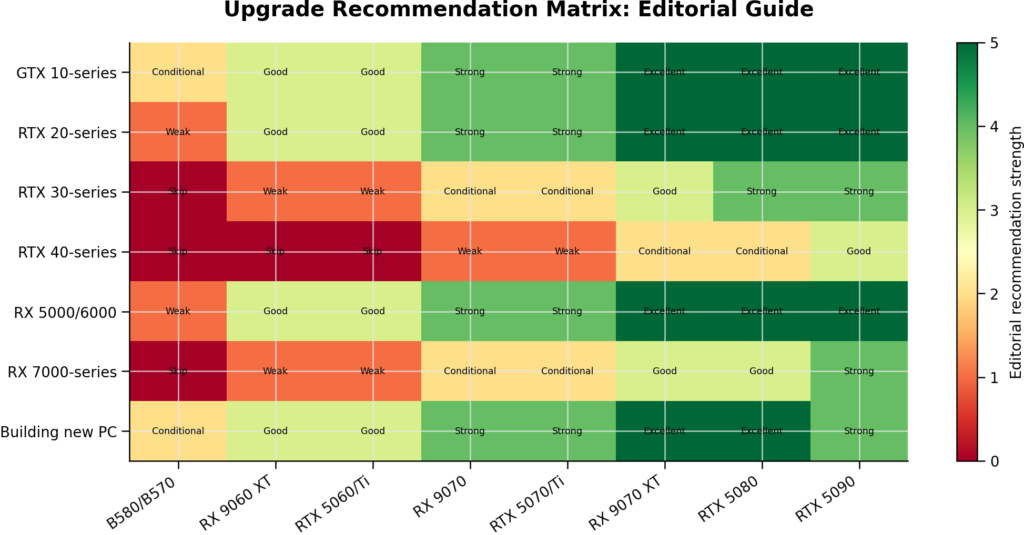
    Should I upgrade?

    GPU Upgrade Guide

    Still Using A GTX 1080?

    Upgrade.

    You’ve had a good run.

    The card belongs in a museum next to my back and knees.


    RTX 2080 Ti Owners

    Upgrade if:

    ✅ You do AI work
    ✅ You render video
    ✅ You moved to 4K

    Stay put if:

    ✅ Games still run how you want


    RTX 3080 Owners

    Honestly?

    You’re still fine.

    This is probably the hardest generation to justify upgrading from.


    RTX 4090 Owners

    Do not upgrade.

    Stop it.

    Go buy something nice for your spouse.


    Gaming Performance Tier Chart

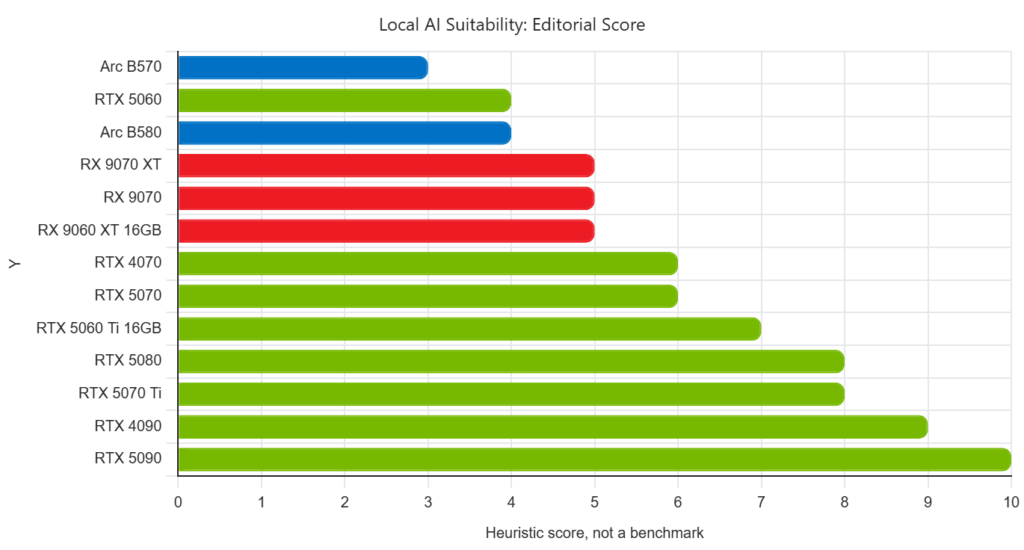
    Local AI Performance

    The Crap Scale Awards

    Best Budget GPU

    💩 Arc B580

    Best Value GPU

    💩 RTX 5070 Ti

    Best AMD GPU

    💩 RX 9070 XT

    Best Productivity GPU

    💩 RTX 5090

    Worst Value GPU

    💩💩💩💩 RTX 5060 8GB

    Best Overall GPU Of 2026

    💩 RTX 5070 Ti

    It isn’t the fastest.
    It isn’t the cheapest.
    It’s the card most people will still be happy they bought three years from now.

  • MSI Liquid Suprim 5090 Review:

    5090 MSI Liquid Suprim

    I hate this thing.

    Not because it’s bad. Quite the opposite. I hate it because every time I look at my credit card statement I briefly consider whether I could have bought a decent used car instead.

    The MSI RTX 5090 SUPRIM LIQUID SOC costs an absolutely stupid amount of money. Nobody should be comfortable spending this much on a graphics card. I certainly wasn’t. Even now I occasionally stare at it and wonder what exactly was wrong with my perfectly functional RTX 2080 Ti.

    Then I actually use it.

    And unfortunately that’s where my argument falls apart.

    The Upgrade From a 2080 Ti Is Ridiculous

    Going from the 2080 Ti to the 5090 isn’t an upgrade. It’s more like skipping several generations of hardware evolution and landing in the future.

    Games obviously run better, but honestly that’s the least interesting thing about this card.

    What surprised me most was how useful the 32GB of VRAM became once I started running local AI models, generating images, rendering projects, and experimenting with workflows that simply weren’t practical on my older hardware.

    Tasks that used to make my system groan now finish before I’ve had a chance to complain about them. In some cases the GPU can produce results faster than I can come up with the next thing to do.

    That’s a weird problem to have.

    Gaming Is Almost An Excuse

    Let’s get this out of the way.

    If your primary goal is gaming, buy a 5080.

    Seriously.

    The 5080 already pushes absurd frame rates, handles ray tracing well, and has enough performance for the vast majority of gamers. Spending the extra money on a 5090 purely for more FPS starts entering the realm of diminishing returns.

    Will the 5090 be faster?

    Of course.

    Will it be thousands-of-dollars-faster?

    Absolutely not.

    The 5090 only starts making sense when you’re using it for more than gaming.

    This Card Feels Like Hiring An Assistant

    The best way I can describe the 5090 is that it doesn’t feel like a hardware purchase.

    It feels like hiring an employee.

    Rendering jobs complete sooner.

    AI image generation runs faster.

    Local language models respond faster.

    Video exports finish faster.

    Everything that relies heavily on GPU acceleration simply gets out of my way.

    The card doesn’t make me work harder. It makes me spend less time waiting.

    Over weeks and months that time adds up quickly, especially if you’re constantly creating content, experimenting with AI tools, or working on projects that would otherwise leave your machine grinding away for hours.

    The Cooling Is Brilliant

    MSI’s SUPRIM LIQUID cooler is complete overkill.

    Which is exactly what you want on a 600-watt monster.

    Temperatures stay impressively low, noise levels remain reasonable, and the card avoids becoming the miniature space heater you’d expect from something drawing this much power.

    You do need room for the radiator, and installation is more involved than a traditional air-cooled card, but that’s the tradeoff for keeping a flagship GPU under control.

    The Price Still Hurts

    I wish I could tell you this card is great value.

    It isn’t.

    It’s a luxury item.

    A very fast luxury item.

    The painful reality is that cheaper RTX 5090s produce nearly the same performance. You’re paying extra for MSI’s premium design, liquid cooling solution, and enthusiast appeal.

    Whether that’s worth it is entirely up to your wallet.

    Mine is still filing complaints.

    Final Poop Score: 💩💩 (2 / 4 Craps)

    The MSI RTX 5090 SUPRIM LIQUID SOC earns 2 Craps.

    Not because it’s slow. Not because it’s loud. Not because MSI did anything wrong.

    It gets 2 Craps because every time I look at the purchase price, a small part of me dies.

    The card itself is phenomenal. The cooling is excellent, the performance jump from my 2080 Ti was enormous, and for AI, rendering, local models, and content creation it honestly feels less like a GPU and more like an extra employee working inside my computer.

    The problem is the cost.

    For gaming alone, I’d tell most people to buy a 5080 and keep the extra money. The 5090 only really starts making sense when you’re using it as a tool that saves you time and increases productivity.

    Do I regret buying it?

    My bank account says yes.

    My workflow says absolutely not.

    Final Verdict: 💩💩
    An outrageously expensive masterpiece.

    Final Verdict

    The MSI RTX 5090 SUPRIM LIQUID SOC is one of the best graphics cards I’ve ever owned and one of the most painful purchases I’ve ever made.

    The performance jump from my RTX 2080 Ti was massive. For gaming it’s incredible, but gaming alone isn’t enough to justify the cost. The real value comes from productivity, rendering, AI workloads, and anything else that can take advantage of the absurd amount of compute power on offer.

    If all you want is more frames in games, buy a 5080 and enjoy having money left over.

    If you spend your days rendering, generating AI content, running local models, or creating things professionally, the 5090 starts looking less like a graphics card and more like an investment in your workflow.

    I still think it’s outrageously expensive.

    I also have absolutely no intention of going back.

    5090 MSI Liquid Suprim
  • Apple Iphone 17 Pro Max Review

    iPhone 17 Pro Max Review: Expensive Crap, But Surprisingly Good Crap

    Product Overview

    Let’s get the obvious part out of the way: the iPhone 17 Pro Max is still a very expensive rectangle. Apple did not reinvent the phone. They did not solve world hunger. They built another giant slab of premium technology and attached a price tag capable of causing mild emotional damage.

    The annoying thing is that they did a pretty good job.

    The iPhone 17 Pro Max combines a 6.9-inch ProMotion display, Apple’s A19 Pro processor, a triple 48MP camera system, and storage options reaching all the way to 2TB. Apple also redesigned the chassis around an aluminum unibody construction and updated thermal management to help sustain performance under heavier workloads. [support.apple.com], [dpreview.com]

    This isn’t revolutionary crap.

    It’s refined crap.

    And that’s honestly what most people want.


    First Impressions

    After years of increasingly tiny upgrades, the iPhone 17 Pro Max feels like Apple finally had its engineers and its accountants sit down in the same room and agree on something.

    The phone feels substantial. The chassis feels solid. Performance borders on absurd for a device that spends most of its life checking emails, scrolling social media, and sending pictures of dogs to family members.

    The display is gorgeous, the cameras are ridiculous, and battery life remains one of the biggest reasons people keep buying the Max models year after year. Apple lists a peak outdoor brightness of up to 3,000 nits and a 120Hz adaptive refresh rate, making this one of the brightest smartphone displays currently available. [support.apple.com]

    Is it exciting?

    Not particularly.

    Is it really, really good?

    Unfortunately, yes.


    What This Crap Is Made Of

    The Chassis

    Apple moved to an aluminum-heavy design that feels noticeably more rigid than many recent flagships.

    The phone uses an aluminum unibody construction with front and rear Ceramic Shield protection. Apple lists the device at 233 grams, which means you’ll absolutely know it’s in your pocket. [support.apple.com]

    The good news is that it feels like a premium tool.

    The bad news is that it weighs roughly the same as a small collapsed star.

    If you’re the type of person who drops your phone onto concrete every few weeks, the stronger frame is welcome.

    If you wear gym shorts often, congratulations on your new leg workout.


    Display

    The 6.9-inch OLED panel is stupidly good.

    Colors are excellent. Motion is smooth. Outdoor visibility is outstanding.

    Apple specifies a Super Retina XDR OLED display with ProMotion up to 120Hz, a 2,000,000:1 contrast ratio, and up to 3,000 nits peak outdoor brightness. [support.apple.com]

    At this point, smartphone displays have become a little like modern refrigerators.

    Nobody gets excited about them anymore because they’re all pretty good.

    The difference is that Apple’s display is one of those refrigerators that somehow dispenses ice, coffee, taxes, and relationship advice.


    Performance

    The A19 Pro chip is complete overkill.

    Apple lists the processor as a six-core CPU paired with a six-core GPU and a sixteen-core Neural Engine. [support.apple.com]

    What does that mean in normal-human language?

    It means you’ll get bored waiting for your coffee long before this phone gets bored running apps.

    Gaming is smooth.

    Photo editing is instant.

    Video editing on a phone has gotten genuinely impressive.

    The limiting factor is no longer the hardware.

    It’s usually the human holding it.


    Camera Crap

    For most buyers, this is the reason you’re here.

    The iPhone 17 Pro Max uses three 48MP rear cameras covering standard, ultrawide, and telephoto shooting. Apple specifies optical-quality zoom options up to 8x through its camera system. [support.apple.com]

    Camera specialists at DPReview highlighted one of the biggest upgrades this year: all three rear cameras now use 48MP sensors, including the telephoto lens. [dpreview.com]

    In practical use, the cameras are excellent.

    Point it at food.

    Point it at your dog.

    Point it at a mountain.

    Point it at your friend making poor life choices.

    The phone will usually make all of it look better than reality.

    Apple’s image processing remains among the most consistent in the industry, and that’s arguably more useful than having the absolute biggest sensor.


    Crap You Didn’t Know

    • The iPhone 17 Pro Max is available with up to 2TB of internal storage. [support.apple.com]
    • Apple lists four camera focal length options generated from its 48MP camera system, extending to an optical-quality 8x zoom equivalent. [support.apple.com]
    • The device uses Apple’s latest Ceramic Shield protection on both the front and rear glass elements. [support.apple.com]
    • The display can drop all the way to 1 nit of brightness for dark-room viewing while still reaching 3,000 nits outdoors. [support.apple.com]

    Because apparently the same phone needs to function both inside a cave and on the surface of the sun.


    What I Like

    Build Quality

    The phone feels sturdy and expensive in a good way.

    Outstanding Display

    One of the best smartphone screens currently available. [support.apple.com]

    Excellent Cameras

    Reliable, versatile, and easy to use.

    Battery Life

    The Max models continue to be battery-life champions for people who actually use their phones all day.

    Long-Term Ownership

    This isn’t disposable tech.

    Most people buying a Pro Max will probably keep it for four to six years, making the painful purchase price easier to justify.


    What Sucks

    The Price

    Let’s stop pretending.

    It’s expensive.

    Very expensive.

    You can buy a lot of things for the cost of a fully loaded Pro Max.

    Some of those things even have wheels.

    Weight

    At 233 grams, this phone is heavy. [support.apple.com]

    Not unusable.

    Just noticeably chunky.

    Incremental Upgrades

    If you’re already carrying a recent Pro or Pro Max model, the differences may not be dramatic enough to justify another giant purchase.

    It’s Still Glass

    I don’t care how many times companies invent new marketing names for glass.

    Glass remains extremely committed to being glass.


    Alternatives To This Crap

    iPhone 17 Pro
    For people who want nearly everything without carrying a brick.

    Samsung Galaxy S25 Ultra
    Fantastic cameras, great screen, and the best stylus experience on a mainstream flagship.

    Google Pixel 10 Pro
    Excellent computational photography and some of Android’s smartest software features.

    Keep Your Current Phone
    Possibly the smartest financial decision on this list.


    Is This Crap Worth Buying?

    If you’re coming from an iPhone 13, 14, or older, absolutely.

    You’ll get a better screen, faster performance, stronger cameras, and a phone that should remain relevant for years.

    If you’re coming from a 16 Pro Max, I’d save the money unless you’re specifically excited about the camera upgrades and other refinements. DPReview noted that the telephoto camera received one of the largest hardware improvements in the new generation. [dpreview.com]

    This is not a revolutionary phone.

    It’s a very polished version of something Apple has been perfecting for nearly two decades.

    And honestly, that’s enough.


    Poop Score: 1 out of 4 Poops

    💩 Good Crap

    The iPhone 17 Pro Max does exactly what a flagship phone should do.

    It’s fast.

    It’s durable.

    It’s packed with genuinely useful technology.

    It’s also brutally expensive.

    Still, if you’re already shopping in this price range, this is some of the best crap money can buy.

    References

    DPReview: iPhone 17 Pro Cameras, What’s New and What’s Unchanged [dpreview.com].

    Apple iPhone 17 Pro Max Technical Specifications: Apple Support [support.apple.com]

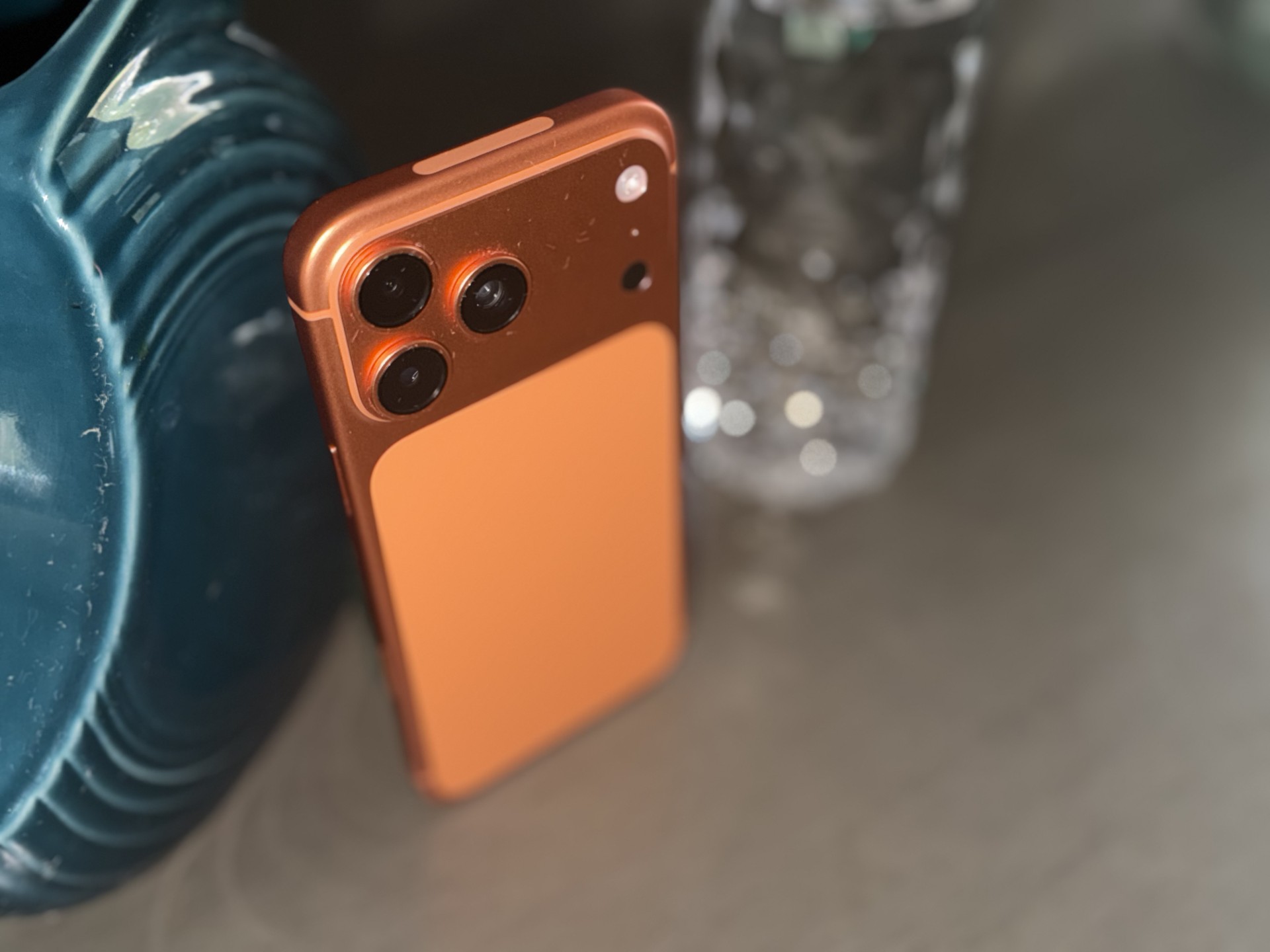
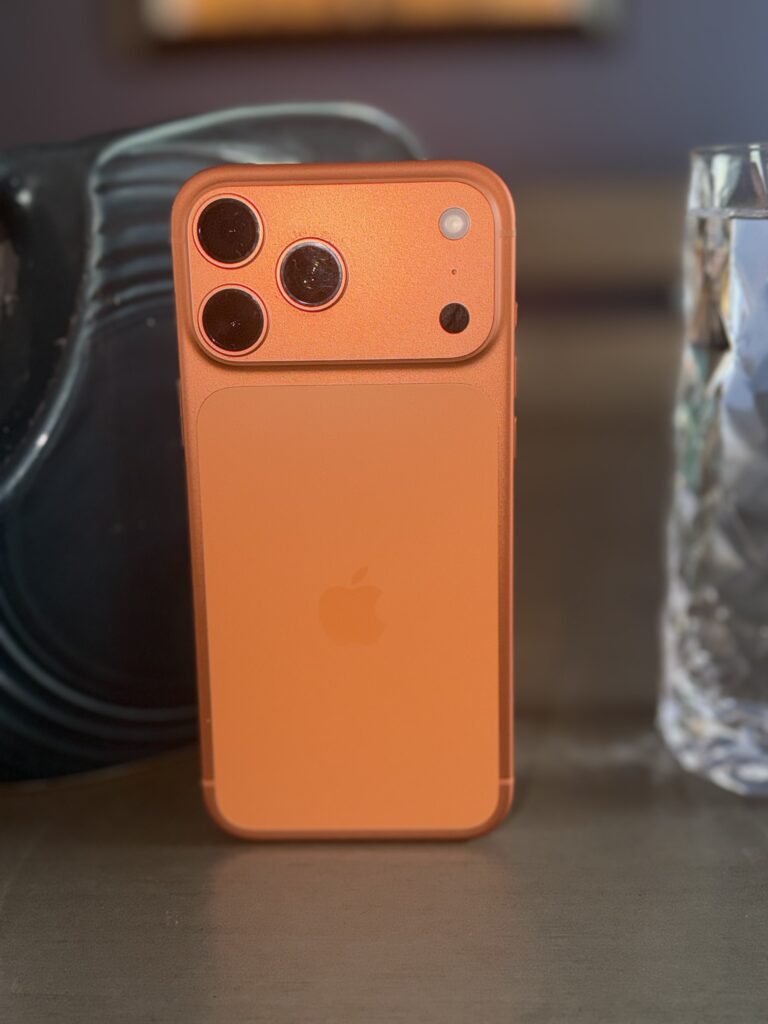
    Burnt Orange Apple iPhone 17 Pro Max Review
    Apple iPhone 17 Pro Max